
Spawn multiple Sur-vehicles - Spawn Point
This section describes the Spawn Point function of the MORAI SIM: Drive, which allows Sur-vehicles (NPC vehicles) to spawn repeatedly at a certain interval and speed.
Spawn Point
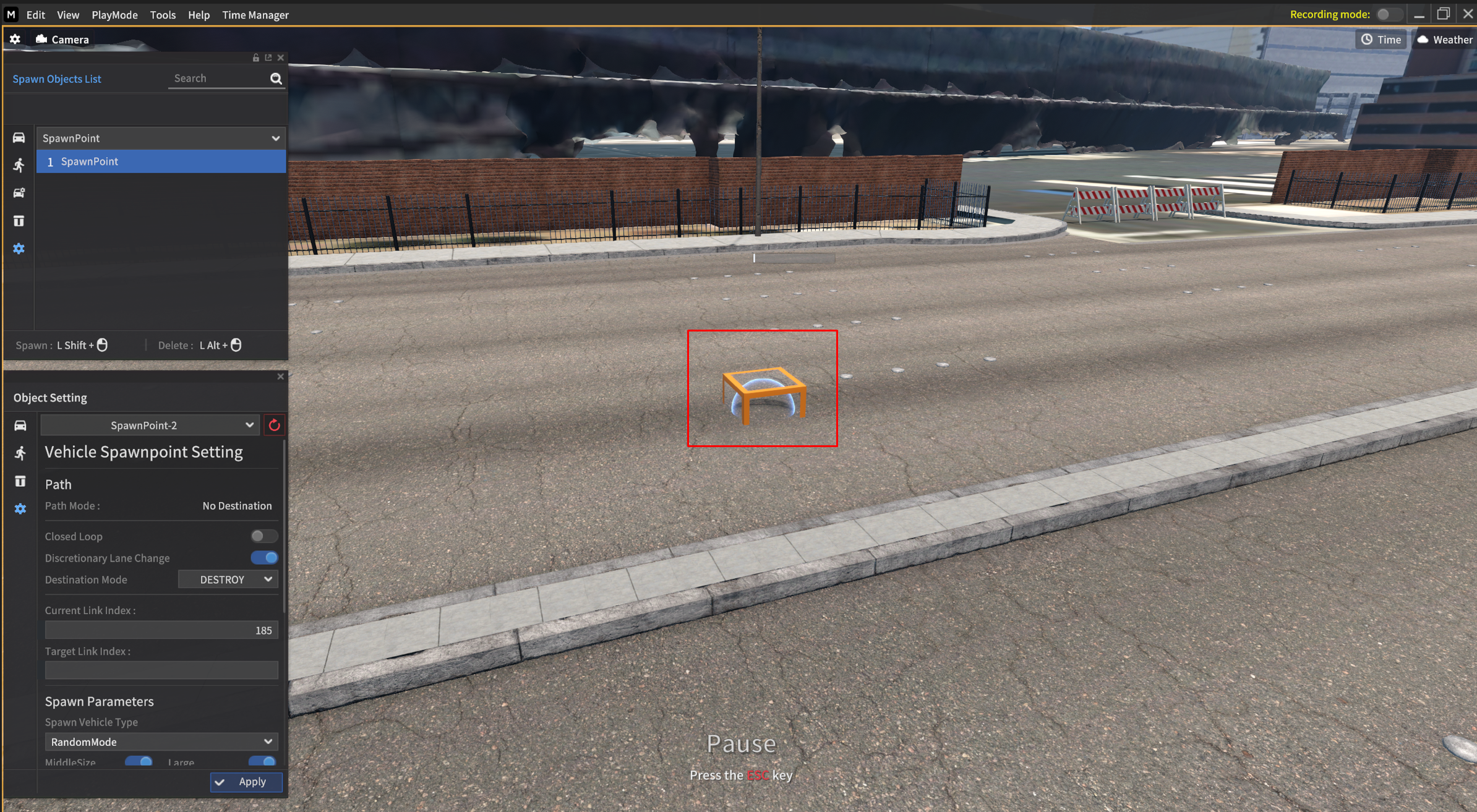
1) Go to Edit > Scenario > Scenario Edit mode to open the Spawn Object List.
2) Select the  icon in the side tab on the left side of the Spawn Object List to create the Spawn Point Object.
3) Press Shift, and then you will see the red box (Spawn Point) in the image above following your mouse cursor.
4) Mouse left-click to determine the start point of the Spawn Point object.
5) Press Alt key + mouse left-click to delete the object.
Spawn Point Setting
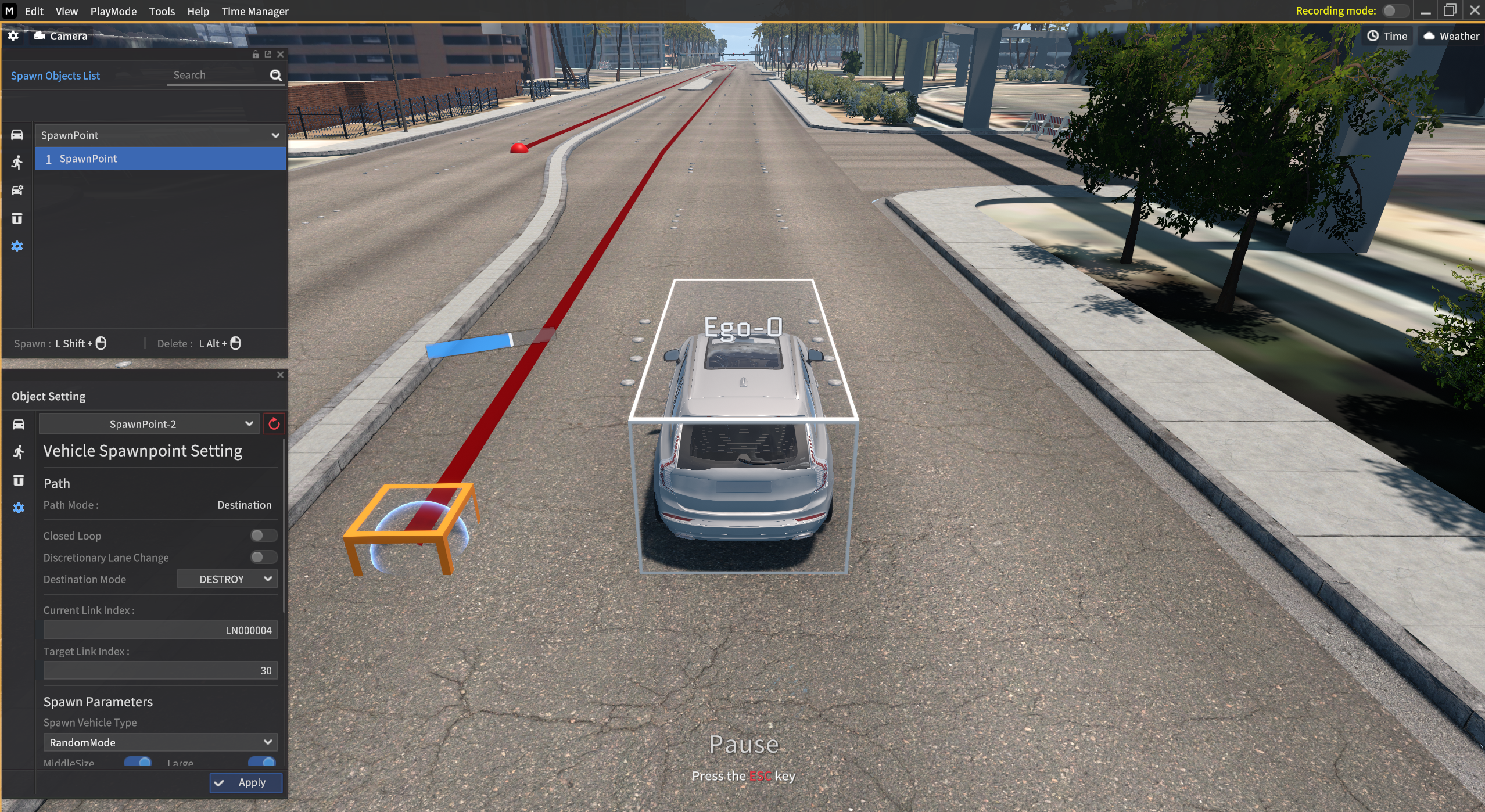
After placing Spawn Point completes, the Object Setting appears directly below the Spawn Object List.
You can adjust the each of the Spawn Point field in the Object Setting.
Set a destination of Spawn Point
You can set a destination of Spawn Point as the same method as Spawn Sur-vehicle (NPC vehicle) | Set-a-destination-point.

[From Ver. 22.R3]
You can change the positions of the Sur-vehicles (NPC vehicles) via mouse drag & drop generated from Spawn Point.
Sur-vehicles (NPC vehicles) Setting generated from Spawn Point
You can set the Sur-vehicle’s options generated from the Spawn Point in the Object Setting.
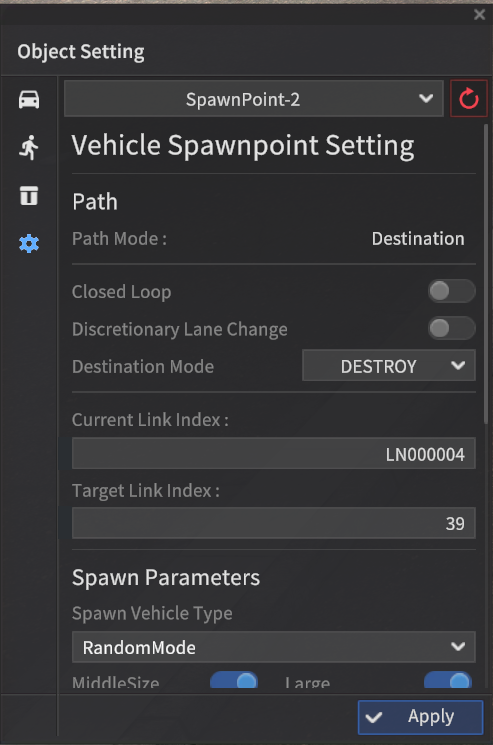
1] Path
Path Mode
Destination : This mode is activated when you set the destination point via
Ctrl+Mouse left-click.No Destination : No set destination point and randomly drives around the map.
Closed Loop : When this mode is activated, setting the destination node automatically calculates the optimal path to the destination and back to the starting node.
Discretionary Lane Change : When toggle switch on, The Sur-vehicle randomly changes the lane.
Destination Mode
DESTROY : The vehicle disappears after it reaches its destination.
STOP : The vehicle stops after it reaches its destination.
Current Link : Displays the current link ID the Sur-vehicle is driving.
Target Link : Displays the target link ID the Sur-vehicle reaches.
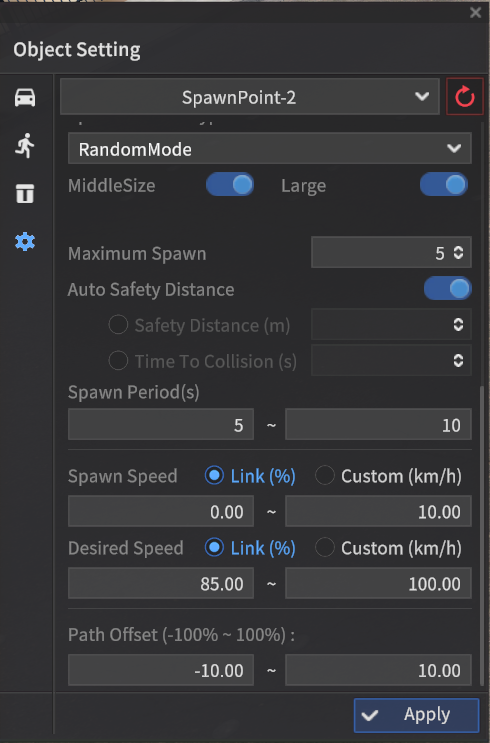
2] Spawn Parameters
Spawn Vehicle Type : Select the vehicle model to Spawn from the starting point
Random Mode : Random vehicle
By overall length (m)
Middle Size : 3.7 <= L < 9
Large : 9 <= L
Maximum Spawn : Maximum numbers of vehicle to spawn
Auto Safety Distance On/Off (When Off, below factors are activated)
Safety Distance (m) : Sufficient distance between Sur-vehicles for safety.
Time To Collision (s) : The time before a collision happens between involved vehicles, if they keep their paths without reducing their speeds.
Learn more: Auto Safety Distance Parameter for NPS vehicles
Spawn Period (s) : The cycle the Sur-vehicle is created.
Spawn Speed (Km/h) : The speed of the spawned Sur-vehicle.
Link (%) : The Sur-vehicle desired speed is set to a percentage value.
When this field set to 80%, the desired speed is set to 40 km/h when the link speed is 50 km/h.
Custom (km/h) : User customizes the Sur-vehicle’s speed.
Desired Speed (km/h) : Sets the target speed of the Sur-vehicle. The vehicle may not be able to reach the target speed depending on the road condition.
Link (%) : The Sur-vehicle desired speed is set to a percentage value.
When this field set to 80%, the desired speed is set to 40 km/h when the link speed is 50 km/h.
Custom (km/h) : User customizes the Sur-vehicle’s speed.
Path Offset (-100% ~ 100%) : Sets how far from the centerline of the lane the Sur-vehicle drives. (left - , right +)
Spawn Point Setting
Bounding Box Setting : When Creating Multiple Objects via gRPC API
When spawning multiple objects via gRPC API, you can choose to merge or separate the Bounding Box for assets containing more than one object.
IS_MULTI_OBJECT_ONE_MODE
True: Merge with a single Bounding Box.
False: Separate the Bounding Box into 2.
Example: When spawn the object Bicycle_Man1, you can either merge the bicycle and the man with a single Bounding Box, or separate them respectively.
ActorSpawnInfo
Common Variables for Actor spawn
Field | Type | Label | Description |
|---|---|---|---|
actor_info | morai_sim_api.ObjectInfo |
| Actor Information |
transform | morai_sim_api.Transform |
| Actor Transform Information |
model_name | string |
| Model name of Actor |
label | string |
| Actor Label provided by MORAI SIM |
is_multi_object_one_mode | bool |
| True : merged false : separate |
color | morai_sim_api.UintColor |
| vehicle color |
label_color | morai_sim_api.UintColor |
| label color |