
ROS SIM Time
This section introduces the method to synchronize MORAI SIM Time with ROS TIME.
Reference page : http://wiki.ros.org/Clock, http://wiki.ros.org/roscpp/Overview/Time
ROS Time System
ROS nodes use ROS Time to maintain a synchronized flow of time when interacting.
ROS Time is essential for operation cycles, message synchronization confirmation, and more.
The time included in the message's header is used to verify synchronization between messages.
The ROS Time default setting uses the operating PC Time.
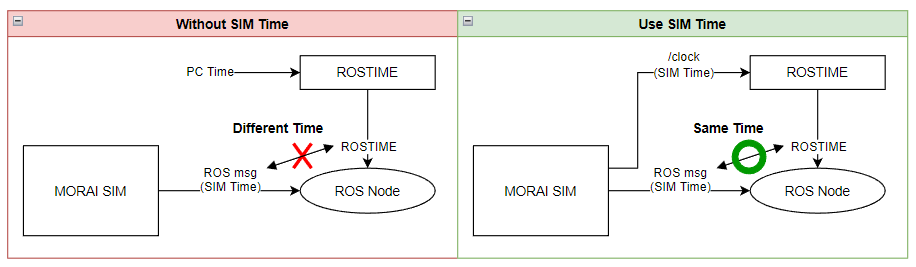
When use_sim_time is enabled and the /clock topic is published, the /clock topic is used as ROS Time instead of the PC Time.
When integrating ROS Time in MORAI SIM Time Management: Use use_sim_time.
If use_sim_time is not enabled, ROS time and MORAI SIM time are not synchronized.
(e.g., Sensor Message subscribe node)
In MORAI SIM, the defined simulation time is entered in the Sensor Message header.
ROS nodes access the current time information by calling ROSTIME.
Since ROSTIME and MORAI SIM Time are different, normal operation is impossible.
MORAI SIM Time is published on the /clock topic to synchronize ROSTIME with the simulator.
Considerations for Development
When publishing a topic, set the IP/Port → Send it to all IPs using ROS.
Publish the /clock topic to all ROS IPs receiving data from the simulator.
The timing and frequency of topic publication need to be determined.
Automatically publish the /clock topic when Time Management runs.
1ms interval.
User Guide (ROS)
After running roscore, set use_sim_time to true in the ROS parameters.
- CODE
rosparam set use_sim_time true
Set to publish the /clock topic in MORAI SIM.