
ROS1 Protocol

Hi, we’re currently fixing missing pieces of this documentation. We are aware of the issues in this page and are working to fix them. Please leave an email with our team and we will notify you when the fixes go live.
This section explains the message types, message topics, and message structures exchanged over ROS 1. Note that any mention of ROS in this page refers to ROS 1.
Intro
Before we start
ROS communicates between different nodes using rostopics that are structured according to standard ROS messages. These standard messages can be extended with custom messages, but these extensions must be compiled and built separately.
MORAI SIM also requires a large extended custom message set – this can be downloaded from a public GitHub repository here: ROS Message File Github
How ROS works
ROS communications are conducted by either topics, services, or actions. Topics are one-way, continuous data streams, suitable for data that needs to be constantly updated, such as sensor states, user input streams, and general telemetry. Topics are composed of message files that have the .msg extension.
Services are an event-triggered one-to-one exchange where a request is processed and a corresponding response is returned to the requester. Typically useful for queries and one-time requests. Services are defined by service messages and have the .srv extension.
The protocols listed in this page will follow either a single .msg format or the request/response structure of a .srv file. Look for each message in their respective msg or srv folders in /morai_msgs.
Ego Network
The Ego Network is a collection of signals and data that relate directly to the egovehicle within the simulation. All network settings categorized under the Ego Network are located in the Ego Network tab of the Network Settings window.
Ego Network is further divided into Cmd Control messages and Publisher/Subscriber/Service type messages.
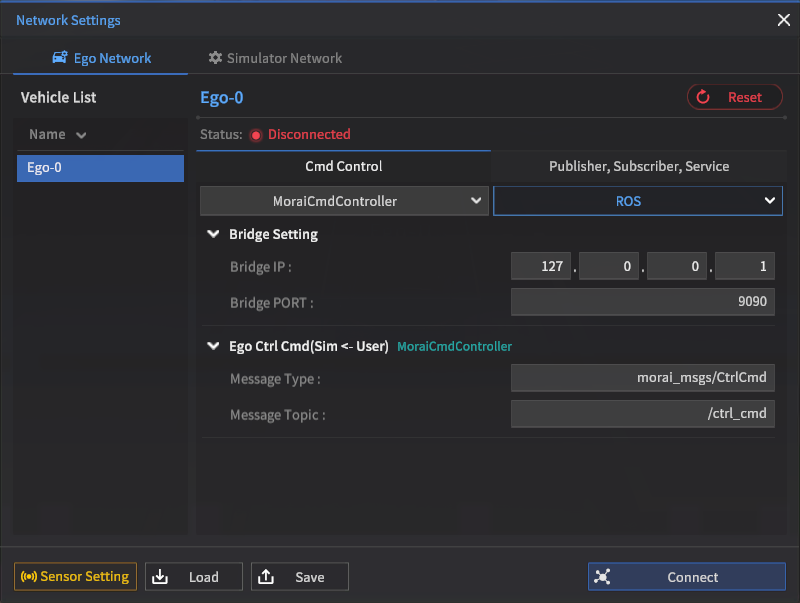
Cmd Control Tab
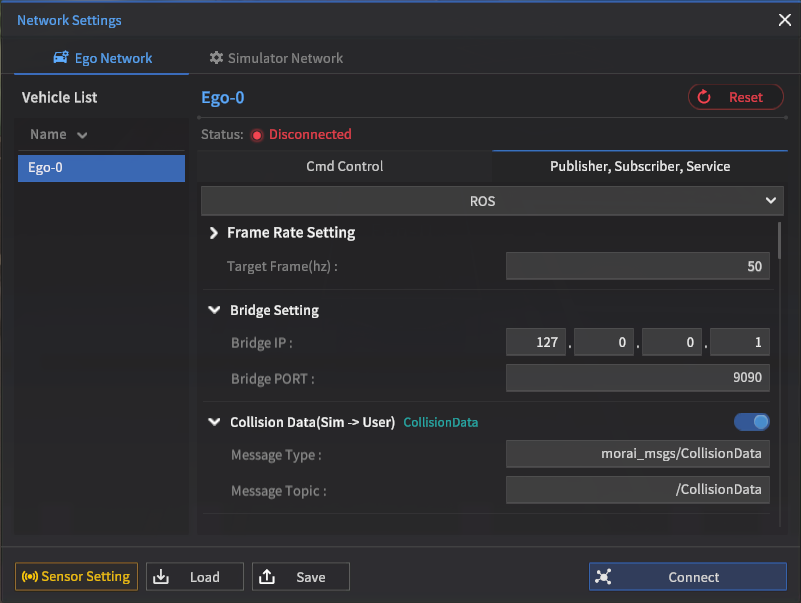
Publisher, Subscriber, Service Tab
Ego Ctrl Cmd
Ego Ctrl Cmd (also MoraiCmdController) messages (shorthand for ego control commands) are used to send control command signals to the egovehicle. These messages typically contain command inputs for steering, moving, and stopping the ego.
Message Type: morai_msgs/CtrlCmd
Default Topic: /ctrl_cmd
No | Name | Type | Unit | Remarks |
|---|---|---|---|---|
1 | longlCmdType | int32 |
| Index to determine the control method. |
2 | accel | float64 | - | Refers the vehicle’s accelerator, and the range value is 0:1. |
3 | brake | float64 | - | Refers the brake of the vehicle, and the range value is 0:1. |
4 | steer angle | float64 | rad | Refers to the front steer angle of the vehicle, measured in radians. |
5 | velocity | float64 | km/h | (Only active if CmdType == 2) |
6 | acceleration | float64 | m/s2 | (Only active if CmdType == 3) |
EXTRA Alternatives to EgoCtrlCmd
Some alternative message types are offered for non-automotive users (e.g. robotics, defense). If not otherwise instructed by your account manager or solutions partner, these messages will not be used. The following messages are typically used mutually exclusively.
WeBOTCmdController
For users of the WeBOT series of robots
Message Type: geometry_msgs/Twist
Default Topic: /commands/vel
Ground Vehicle Direct Ctrl Cmd
For direct control of skid-steer enabled vehicles
Message Type: morai_msgs/GVDirectCmd
Default Topic: /gv_direct_cmd
No | Name | Type | Len [byte] | Description |
|---|---|---|---|---|
1 | steer_type | uint32_t | 4 | Refer to the Table 1. |
2 | throttle | float | 4 | Range is -1:1 |
3 | skid_steering | float | 4 | Range is -1:1 |
4 | steer_angle | float[10] | 40 | Range is -1:1 |
Ground Vehicle State Ctrl Cmd
For state control of skid-steer enabled vehicles
Message Type: morai_msgs/GVStateCmd
Default Topic: /gv_state_cmd
No | Name | Type | Len [byte] | Description |
|---|---|---|---|---|
1 | TargetLongitudinalVelocity | float | 4 | m/s |
2 | TargetAngularVelocity | float | 4 | rad/s |
Ghost Ctrl Cmd
Ghost Mode refers to a feature in MORAI SIM where instead of providing live command inputs to the ego, you can read a recorded data file (maybe in a rosbag file) and use the data log to control the ego vehicle. This is similar to re-simulation features of other simulation products.
Activate GhostCtrlCmd by using the drop-down menu to switch from the default MoraiCmdController
Message Type: morai_msgs/GhostMessage
Default Topic: /ghost_ctrl_cmd
No | Name | Type | Unit | Remarks |
|---|---|---|---|---|
1 | position | m | Specify the egovehicle’s position (X, Y, Z). | |
2 | rotation | deg | Specify the egovehicle’s rotation (Roll, Pitch, Yaw). | |
3 | velocity | float64 | km/h | Speed of the egovehicle. |
4 | steering_angle | float64 | deg | Steer angle of the egovehicle’s front wheel. |
NPC Ghost Cmd
Control commands for NPC/traffic vehicles that controlled externally using Ghost Mode.
Message Type: morai_msgs/NpcGhostCmd
Default Topic: /NpcGhost_Topic
No | Name | Type | Unit | Remarks |
|---|---|---|---|---|
1 | header | Header | - |
|
2 | npc_list | - | NPC Ghost Vehicle information |
NPC Ghost Info
Message Type: morai_msgs/NpcGhostInfo
Default Topic: N/A (is a subtype)
No | Name | Type | Unit | Remarks |
|---|---|---|---|---|
1 | unique_id | int32 | - | unique_id value of the NPC Ghost Vehicle (Example: 2,3,4..) |
2 | name | string | - | Model name of the NPC Ghost Vehicle (Example: 2016_Kia_Niro(HEV)) |
3 | position | m | Position of the NPC Ghost Vehicle (X, Y, Z) in ENU coordinates | |
4 | rpy | deg | Rotation of the NPC Ghost Vehicle (Roll, Pitch, Yaw) | |
5 | steering_angle | float32 | deg | Steering angle in degrees |
6 | vehicle_speed | float32 | km/h | Vehicle velocity in kph |
7 | turn_signal | uint32 | - | Indicates the current state of the turn signal |
8 | brake_light | bool | - | Indicates brake lights (false: off, true: on) |
Ego Vehicle Status
Ego Vehicle Status (also MoraiInfoPublisher) streams status telemetry of the egovehicle. Most vehicle dynamics data and control status data are provided and typically used for closed-loop control.
Message Type: morai_msgs/EgoVehicleStatus
Default Topic: /Ego_topic
No | Name | Type | Unit | Remarks |
|---|---|---|---|---|
1 | header | Header | - | Message header. |
2 | unique_id | int32 | - | unique id value of the object. |
3 | acceleration | m/s2 | Current acceleration vector value of the egovehicle. | |
4 | position | m | Current position of the egovehicle. | |
5 | velocity | m/s | Current velocity vector value of the egovehicle. | |
6 | heading | float64 | deg | Indicates the vehicle’s heading (deg). |
7 | accel | float32 | - | Refers to the vehicle’s acceleration pedal and the range value is 0:1. |
8 | brake | float32 | - | Refers to the vehicle’s brake and the range value is 0:1. |
9 | front_steer_angle | float32 | deg | Refers to the current front wheel angle value of the ego. |
10 | rear_steer_angle | float32 | deg | Rear wheel angle of the ego |
11 | lateral_offset | float32 | ||
12 | tire_lateral_force_fl | float32 | ||
13 | tire_lateral_force_fr | float32 | ||
14 | tire_lateral_force_rl | float32 | ||
15 | tire_lateral_force_rr | float32 | ||
16 | side_slip_angle_fl | float32 | ||
17 | side_slip_angle_fr | float32 | ||
18 | side_slip_angle_rl | float32 | ||
19 | side_slip_angle_rr | float32 | ||
20 | tire_cornering_stiffness_fl | float32 | ||
21 | tire_cornering_stiffness_fr | float32 | ||
22 | tire_cornering_stiffness_rl | float32 | ||
23 | tire_cornering_stiffness_rr | float32 | ||
24 | distance_left_lane_boundary | float32 | m | Distance of the egovehicle’s center from the nearest left lane boundary marking |
25 | distance_right_lane_boundary | float32 | m | Distance of the egovehicle’s center from the nearest left lane boundary marking |
26 | cross_track_error | float32 | m | Distance from the center of the lane (right is positive) |
Object Status List
Object Status List (also MoraiObjectInfoPublisher) lists and contains details of the 20 closest objects around the egovehicle. Objects are NPC vehicles, pedestrians, or placed static obstacles. This list is updated as the egovehicle moves around the scene and is ordered from closest object to the furthest.
Message Type: morai_msgs/ObjectStatusList
Default Topic: /Object_topic
No | Name | Type | Unit | Remarks |
|---|---|---|---|---|
1 | header | Header | - |
|
2 | num_of_npcs | int32 | - | Number of NPC vehicles which the user spawned. |
3 | num_of_pedestrian | int32 | - | Number of pedestrians the user spawned. |
4 | num_of_obstacle | int32 | - | Number of obstacles (static objects) the user spawned. |
5 | npc_list | - | NPC Vehicle information ( Refer to the below ObjectStatus type.) | |
6 | pedestrian_list | - | Pedestrian information ( Refer to the below ObjectStatus type.) | |
7 | obstacle_list | - | Obstacle information (Refer to the below ObjectStatus type.) |
Object Status
Message Type: morai_msgs/ObjectStatus
Default Topic: N/A (is a subtype)
No | Name | Type | Unit | Remarks |
|---|---|---|---|---|
1 | unique_id | int32 | - | Object’s unique id value. |
2 | type | int32 | - | 0: Pedestrian, 1: NPC vehicle, 2: Static object (obstacle), -1: egovehicle. |
3 | name | string | - | Object name. |
4 | heading | float64 | deg | Indicates the object’s heading (deg). |
5 | velocity | km/h | Current velocity vector value of the object. | |
6 | acceleration | m/s2 | Current acceleration vector value of the object. | |
7 | size | m | Object’s size (width, length, height) | |
8 | position | m | Object’s current position (in ENU coordinates) |
Collision Data
CollisionData records the most recent collision between the egovehicle and any placed object (vehicles/pedestrians/obstacles). Does not register collisions with the environment.
Message Type: morai_msgs/CollisionData
Default Topic: /CollisionData
No | Name | Type | Unit | Remarks |
|---|---|---|---|---|
1 | header | Header | - |
|
2 | global_offset_x | float64 |
| The x-axis position of the collided object w.r.t the map coordinate system |
3 | global_offset_y | float64 |
| The y-axis position of the collided object w.r.t the map coordinate system |
4 | global_offset_z | float64 |
| The z-axis position of the collided object w.r.t the map coordinate system |
5 | collision_object | - | An object’s collision data with the egovehicle. |
Get Traffic Light Status
Get Traffic Light Status (also TLStatusPublisher) queries the closest traffic light to the egovehicle and returns the type of traffic light and what the current lit state is. Useful as a ground truth reference for any vision detectors for traffic lights. Only works when using a scene with traffic lights enabled.
Message Type: morai_msgs/GetTrafficLightStatus
Default Topic: /GetTrafficLightStatus
No | Name | Type | Unit | Remarks |
|---|---|---|---|---|
1 | header | Header | - |
|
2 | trafficLightIndex | string | - | Unique index value of the traffic light. |
3 | trafficLightType | int16 | - | Returns the type of the traffic light. 0: Red/Yellow/Green |
4 | trafficLightStatus | int16 | - | Current state value of the traffic light. 1: Red Combined lights (multiple lights on simultaneously) can be applied using standard bitwise operations |
Set Traffic Light Control
Set Traffic Light Control (also TLCtrlSubscriber) is the control command that instead instructs a specific traffic light to change to the user’s desired state. A user may generate multiple topics to set more than one traffic light in the scene. Like Get Traffic Light Status, only works when the loaded scene has traffic lights enabled.
Message Type: morai_msgs/SetTrafficLight
Default Topic: /SetTrafficLight
No | Name | Type | Unit | Remarks |
|---|---|---|---|---|
1 | trafficLightIndex | string | - | Unique index value of the traffic light. |
2 | trafficLightStatus | int16 | - | Desired state value of the traffic light. 1: Red |
Get Intersection Status
IntersectionStatusPublisher (Sim → User)
Message Type: morai_msgs/IntersectionStatus
Default Topic: /InsnStatus
No | Name | Type | Unit | Remarks |
|---|---|---|---|---|
1 | header | Header | - |
|
2 | intersection_index | int32 | - | Intersection index. |
3 | intersection_status | int16 | - | Intersection status. |
4 | intersection_status_time | float32 | s | Elapsed time(s) in the current intersection status. |
Set Intersection Control
IntersectionControlSubscriber (User → Sim)
Message Type: morai_msgs/IntersectionControl
Default Topic: /InsnControl
No | Name | Type | Unit | Remarks |
|---|---|---|---|---|
1 | header | Header | - |
|
2 | intersection_index | int32 | - | Intersection index. |
3 | intersection_status | int16 | - | Intersection Status. |
4 | intersection_status_time | float32 | - | Elapsed time (s) in the current intersection status. |
Scenario Load
MORAISLSubscriber (User → Sim)
Message Type: morai_msgs/ScenarioLoad
Default Topic: /ScenarioLoad
No | Name | Type | Unit | Remarks |
|---|---|---|---|---|
1 | file_name | string | - | Scenario_file_name to load. |
2 | delete_all | bool | - |
|
3 | load_network_connection_data | bool | - |
|
4 | load_ego_vehicle_data | bool | - |
|
5 | load_surrounding_vehicle_data | bool | - |
|
6 | load_pedestrian_data | bool | - |
|
7 | load_object_data | bool | - |
|
8 | set_pause | bool | - |
|
SaveSensorData
SensorSyncDataSubscriber (User → Sim)
Message Type: morai_msgs/SaveSensorData
Default Topic: /SaveSensorData
No | Name | Type | Unit | Remarks |
|---|---|---|---|---|
1 | is_custom_file_name | bool | - | Determines if the save file name is custom input by the user |
2 | custom_file_name | string | - | The custom save file name input by the user |
3 | file_dir | string | - | The full path string of the save file |
Turn Signal Lamp Control
Lamps
Message Type: morai_msgs/Lamps
Default Topic: /lamps
No | Name | Type | Unit | Remarks |
|---|---|---|---|---|
1 | header | Header | - |
|
2 | turnSignal | int8 | - | 0: No signal, 1: Left turn signal, 2: Right turn signal |
3 | emergencySignal | int8 | - | 0: No signal, 1: Emergency lamps on |
Replay Info
MoraiReplayInfoPublisher (Sim → User)
Message Type: morai_msgs/ReplayInfo
Default Topic: /ReplayInfo_topic
No | Name | Type | Unit | Remarks |
|---|---|---|---|---|
1 | header | Header | - |
|
2 | ego_acc | float64 | - | Refers to the vehicle’s acceleration pedal value, and the range value is 0~1. |
3 | ego_brake | float64 | - | Refers to the vehicle’s brake pedal value, and the range value is 0~1. |
4 | ego_steer | float64 | deg | Refers to the front wheel angle of the vehicle, measured in degrees. |
5 | orientation | - | Current orientation. | |
6 | linear_acceleration |
| Current acceleration. | |
7 | angular_velocity |
| Current angular velocity. | |
8 | num_of_npcs | int32 | - | Number of NPC vehicles user spawned. |
9 | num_of_pedestrian | int32 | - | Number of pedestrians user spawned. |
10 | num_of_obstacle | int32 | - | Number of objects (static objects) user spawned. |
11 | npc_list | - | NPC vehicle information. | |
12 | pedestrian_list | - | Pedestrian information. | |
13 | obstacle_list | - | Obstacle information. |
SensorPoseSubscriber
Message Type: morai_msgs/SensorPosControl
Default Topic: /SensorPosControl
No | Name | Type | Unit | Remarks |
|---|---|---|---|---|
1 | sensor_index | int16 | - | Sensor index for identifying each sensor 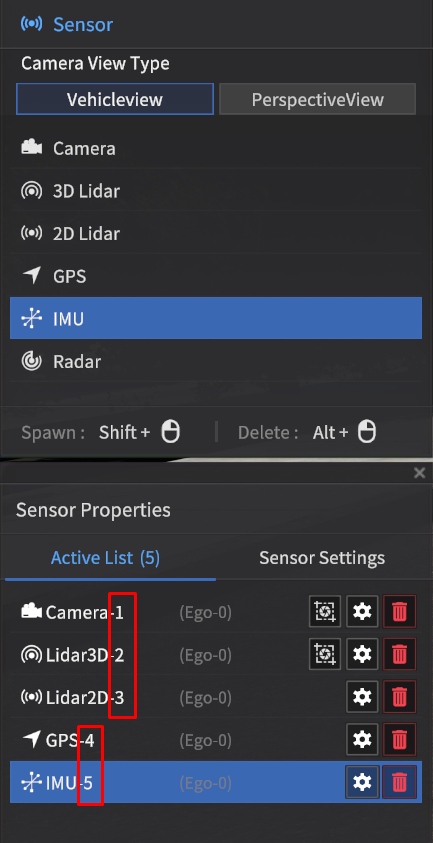 Index number follows the numbers shown in the sensor UI |
2 | pose_x | float32 | m |
|
3 | pose_y | float32 | m |
|
4 | pose_z | float32 | m |
|
5 | roll | float32 | rad | Sensor Roll angle. |
6 | pitch | float32 | rad | Sensor Pitch angle. |
7 | yaw | float32 | rad | Sensor Yaw angle. |
rosbag Playback
Used with its corresponding service message (MoraiSimProcServiceProvider), the rosbag Playback command (also MoraiSimProcHandle) contains the specific playback commands and conditions that are sent to the simulator.
Message Type : morai_msgs/MoraiSimProcHandle
No | Name | Type | Unit | Remarks |
|---|---|---|---|---|
1 | sim_process_status | uint8 | - | Current playback state 1: Playing, 2: Paused, 32: Stopped |
2 | replay_option | int16 | - | Defines the specific type of command 0x0001: load file Which options are chosen determine which of the following fields (replay_speed, start_time, etc) are read. Note that multiple options can be chosen simultaneously with bitwise AND. |
3 | rosbag_file_name | string | - | The filename of the rosbag file to load |
4 | replay_target_option | int16 | - | Designates the target of the playback command 0x0001: egovehicle |
5 | replay_speed | int32 | - | Playback speed value multiplier (e.g., 1x, 2x, …) |
6 | start_time | int32 | ms | Start time in milliseconds |
Event Control Request
Event Control Request (also MoraiEventCmdServiceProvider) sends external commands to start single events that change the state of the vehicle. Differs from the Ego Ctrl Cmd message as Event Control Request is a one-time message and not a continuous command message.
Service Type: morai_msgs/MoraiEventCmdSrv
Service Name: /Service_MoraiEventCmd
EventInfo request
---
EventInfo response
Event Info
Event Info packs state info that is sent and later received from the simulator. Acts as both the request and response message format.
Message Type: morai_msgs/EventInfo
Default Topic:
No | Name | Type | Unit | Remarks |
|---|---|---|---|---|
1 | option | int8 | - | Defines which of the following commands is to be applied. Multiple commands can be selected simultaneously through bitwise AND 0x0001: ctrl_mode |
2 | ctrl_mode | int32 | - | Sets the vehicle’s control mode |
3 | gear | int32 | - | Changes the gear of the vehicle -1: No change, 1: Parking, 2: Reverse, 3: Neutral, 4: Drive No manual gear levels are assigned with this command |
4 | lamps | - | Controls the lights of the vehicle. Refer to the Lamps type | |
5 | set_pause | bool | - | When |
Map Data Call
Map Specifications Call (also MoraiMapSpecServiceProvider) asks the simulator for the specifications of the currently loaded driving environment. Data is received through the MapSpec message.
Service Type: morai_msgs/MoraiMapSpecSrv
Service Name: /Service_MoraiMapSpec
MapSpecIndex request
---
MapSpec response
Map Spec Index
Message Type : morai_msgs/MapSpecIndex
No | Name | Type | Unit | Remarks |
|---|---|---|---|---|
1 | load_map_data | bool | - | Queries whether map data is called |
Map Spec Return
Message Type : morai_msgs/MapSpec
No | Name | Type | Unit | Remarks |
|---|---|---|---|---|
1 | plane_coordinate_system | int32 | - | The map’s coordinate reference system 0: Uses UTM CRS, 1: Uses TM CRS |
2 | utm_num | int32 | - | Indicates the numbered UTM zone. Range is 1:60 |
3 | utm_offset | Vector3 | - | Sets a local offset in [x, y, z] coordinates |
4 | ellipse | string | - | Ellipsoid type (e.g.: WGS84, GRS80, etc) |
5 | central_latitude | float64 | - | Central latitude (acts as x-axis origin) |
6 | central_meridian | float64 | - | Central longitude (acts as y-axis origin) |
7 | scale_factor | float64 | - | Scale multiplier, typically set to 1.0 |
8 | false_easting | float64 | - | Additional x-axis offset |
9 | false_northing | float64 | - | Additional y-axis offset |
Simulator Network
The Simulator Network tab attempts to distinguish signals not directly related to the egovehicle and organizes these signals in a separate tab. Many of these signals are service messages.
Some service messages are defined in the Simulator Network tab, but their request/response signals may be defined in the Ego Network tab. This UI issue is known and inconvenient, but should not affect the underlying function.
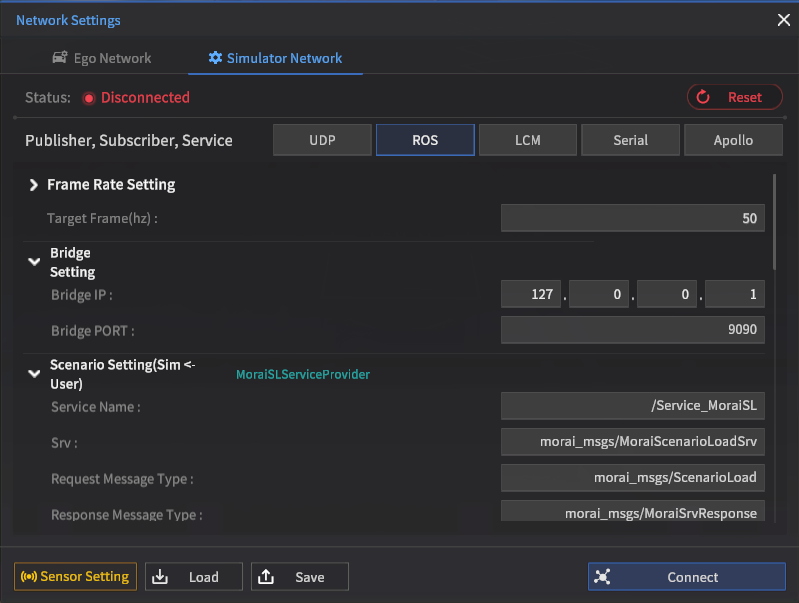
Simulator Network tab
Scenario Load Service
Scenario Load Service (also MoraiSLServiceProvider) calls a request to load into a scenario and instructs the simulator to search for requested local files. This feature is used to start scenarios externally using ROS as an API.
Service Type: morai_msgs/MoraiScenarioLoadSrv
Service Name: /Service_MoraiSL
ScenarioLoad request
---
MoraiSrvResponse response
Scenario Load
Refer to the message contents in the Ego Network section here (link)
Run rosbag Replay Service
Starting a rosbag replay (also MoraiSimProcServiceProvider) starts the process to load a rosbag file and replay its saved data track.
Service Type: morai_msgs/MoraiSimProcSrv
Service Name: /Morai_SimProc
MoraiSimProcHandle request
---
MoraiSrvResponse response
Morai Sim Proc Handle
Refer to the message contents in the Ego Network section here (link)
Replay System Status
(also MoraiSimProcStatusPublisher)
Message Type: morai_msgs/MoraiSimProcStatus
Default Topic: /sim/process/state/msg/MoraiSimProcStatus
No | Name | Type | Unit | Remarks |
|---|---|---|---|---|
1 | header | Header | - |
|
2 | latest_command_time | - | The timestamp of the last MoraiSimProcHandle value received (using the time in SimProcHandle/header). If it has not been received at all, it will be 0. | |
3 | command_result | uint8 | - | 0x00: initial, 0x01: success, 0x10: command failed, 0x20: failed rosbag file load, 0x30: loaded rosbag but failed |
4 | current_mode | uint8 | - | 0x01: simulation mode, 0x10: replay mode |
5 | current_status | uint8 | - | 0x01: running, 0x10: paused, 0x20: paused and reached end of rosbag file |
Multi Ego Setting
Multi Ego Settings (also MultiEgoTransformHandler) is used to control multiple vehicles in a scene with external controllers.
Message Type: morai_msgs/MultiEgoSetting
Default Topic: /ego_setting
No | Name | Type | Unit | Remarks |
|---|---|---|---|---|
1 | number_of_ego_vehicle | int32 | - | Number of Multi-Ego vehicles. |
2 | camera_index | int32 | - | Unique index of the vehicle to be viewed when setting up Multi-ego. |
3 | ego_index | int32[] | - | unique index of the Multi-ego to control. |
4 | global_position_x | float64[] |
| Current X-axis position of Multi-ego. |
5 | global_position_y | float64[] |
| Current Y-axis position of Multi-ego. |
6 | global_position_z | float64[] |
| Current Z-axis position of Multi-ego (elevation). |
7 | global_roll | float32[] |
| Current Roll angle of the Multi-ego. |
8 | global_pitch | float32[] |
| Current Pitch angle of the Multi-ego. |
9 | global_yaw | float32[] |
| Current heading angle of the Multi-ego. |
10 | velocity | float32[] |
| Multi-Ego’s velocity |
11 | gear | int8[] | - | 1: Parking, 2: Reverse, 3: Neutral, 4: Drive |
12 | ctrl_mode | int8[] | - | 1: keyboard mode, 16: automode |
NPC Vehicle Collision Data
Returns the collisions between different NPC vehicles into VehicleCollisionInfoPublisher. Is distinct from Collision Data, which only logs collisions involving the egovehicle.
Message Type: morai_msgs/VehicleCollisionData
Default Topic: /VehicleCollisionData
No | Name | Type | Unit | Remarks |
|---|---|---|---|---|
1 | header | Header | - |
|
2 | collisions | - | Collided NPC vehicles list. |
Vehicle Collision List
VehicleCollision is a list used in VehicleCollisionInfoPublisher and does not have a separate topic for independent use.
Message Type: morai_msgs/VehicleCollision
Default Topic: N/A (is a subtype)
No | Name | Type | Unit | Remarks |
|---|---|---|---|---|
1 | crashed_vehicles | - | Collided NPC vehicle information. |
Traffic Light Status
Traffic Light Status (also MoraiSLServiceProvider) asks the simulator for the current state of a specific traffic light in the driving environment. Unlike the Get Traffic Light Status message in the Ego Network section, this service is not limited to just the closest traffic light to the egovehicle, but it can query data from the entire map.
Service Type: morai_msgs/MoraiTLInfoSrv
Service Name: /Morai_TLSrv
MoraiTLIndex request
---
MoraiTLInfo response
Traffic Light Index
Message Type: morai_msgs/MoraiTLIndex
No | Name | Type | Unit | Remarks |
|---|---|---|---|---|
1 | idx | string | - | Unique ID of the requested traffic light |
Traffic Light Info
Message Type: morai_msgs/MoraiTLInfo
No | Name | Type | Unit | Remarks |
|---|---|---|---|---|
1 | header | Header | - |
|
2 | idx | string | - | Unique index value of the traffic light. |
4 | status | int16 | - | Current state value of the traffic light. 0x0001: Red Combined lights (multiple lights on simultaneously) can be applied using standard bitwise operations |
Vehicle Specifications Request
Vehicle Specifications Request (also MoraiVehicleSpecServiceProvider) similar to the Map Data Call service, asks the simulator for information on a specific selected vehicle. Is valid as long as the selected vehicle exists in the scene (having a unique ID value). Returns information via the VehicleSpec message. This message pair is useful for querying the simulator for ground truth data of NPC vehicles to compare to sensor model outputs (e.g., bounding box sizes)
Service Type: morai_msgs/MoraiVehicleSpecSrv
Service Name : /Service_MoraiVehicleSpec
VehicleSpecIndex request
---
VehicleSpec response
Vehicle Spec Index
Message Type: morai_msgs/VehicleSpecIndex
No | Name | Type | Unit | Remarks |
|---|---|---|---|---|
1 | unique_id | int32 | - | Unique ID of the requested vehicle |
Vehicle Spec Return
Message Type: morai_msgs/VehicleSpec
No | Name | Type | Unit | Remarks |
|---|---|---|---|---|
1 | size | Vector3 | - | Vehicle’s size in the X, Y, and Z axes |
2 | wheel_base | float32 | m | Length of the vehicle’s wheelbase |
3 | max_steering | float64 | deg | Maximum steering angle |
4 | overhang | float32 | m | Length of the vehicle’s front overhang |
5 | rear_overhang | float32 | m | Length of the vehicle’s rear overhang |